Security
Use Security to manage workspace authentication and SSO settings.
What you can do here
- Choose the workspace login mode.
- Configure Microsoft Entra ID SSO values.
- Copy or reset the redirect URI.
- Restrict access to allowed email domains.
- Save workspace security changes.
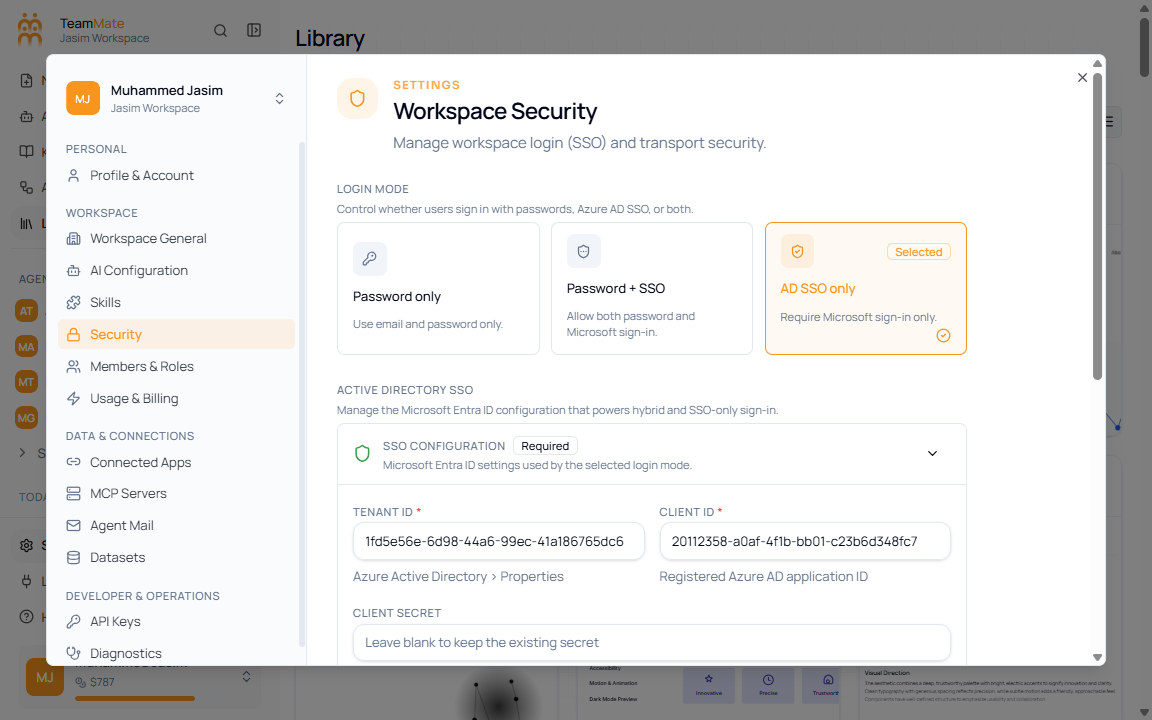
Login modes
| Mode | What it means |
|---|---|
| Password only | Users sign in with email and password only. |
| Password + SSO | Users can use password or Microsoft sign-in. |
| AD SSO only | Users must use Microsoft sign-in. |
SSO fields
| Field | What it controls |
|---|---|
| Directory ID | Microsoft Entra directory identifier. |
| Client ID | Azure app client identifier. |
| Client Secret | Azure app secret. Leave blank when keeping an existing secret. |
| Redirect URI | Callback URL to register in Azure. |
| Allowed domains | Email domains allowed to use the SSO configuration. |