Authentication & API keys
Every public API request is authenticated with a workspace API key sent as a Bearer token. Keys are scoped to one workspace and one user.
1. Create an API key
API keys are created in the app, not via the API (you can’t mint a key with a key). Creating keys requires the workspace admin role.
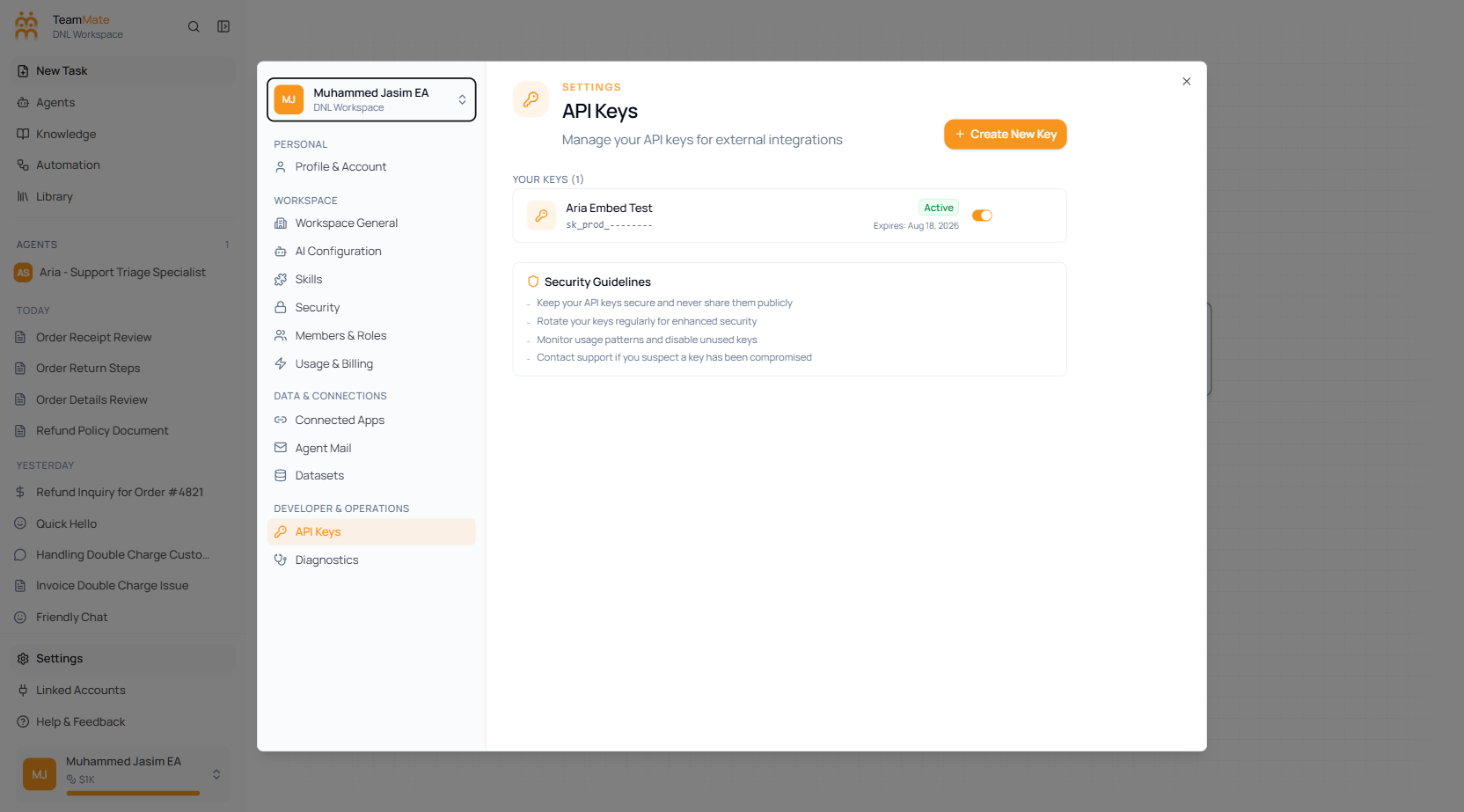
- Open Settings (bottom of the sidebar) → Developer & Operations → API Keys.
- Click Create API key.
- Give it a name (3–50 chars), an optional description, and an expiry (
15d,25d,45d,90d,6m, or1y). - Copy the key immediately — the full value is shown only once, for a few minutes. After that only a masked preview is stored.
A key looks like:
sk_prod_3f9a1c7e2b8d4056a1c2e3f40516a7b8Keys are stored hashed (SHA-256). Treat a key like a password: never commit it to source control or expose it in client-side code. If a key leaks, deactivate or delete it from the same screen and create a new one.
2. Send the key
Pass the key in the Authorization header as a Bearer token:
curl https://tmmate.ai/api/v1/capabilities \
  -H "Authorization: Bearer sk_prod_xxxxxxxxxxxxxxxxxxxxxxxxxxxxxxxx"
const res = await fetch("https://tmmate.ai/api/v1/capabilities", {
headers: { Authorization: `Bearer ${process.env.TEAMMATE_API_KEY}` },
})
const { data } = await res.json()import os, requests
res = requests.get(
"https://tmmate.ai/api/v1/capabilities",
headers={"Authorization": f"Bearer {os.environ['TEAMMATE_API_KEY']}"},
)
data = res.json()["data"]The Bearer prefix is recommended; the bare key is also accepted. Anything that doesn’t start with sk_prod_ is rejected as a non-API-key token.
3. Access levels: admin vs member
A key inherits the workspace role of the user it belongs to. Endpoints fall into two tiers:
| Tier | Who can call it | Endpoints |
|---|---|---|
| Admin | The key’s user must be a workspace admin | All of Agents, all of Capabilities, and knowledge-base management (create / list / get / update / delete / content / file upload) — see Manage knowledge bases |
| Member | Any workspace member with a valid key | Knowledge-base runtime — search, query (RAG), status, and embeddings — see Search & query |
Calling an admin endpoint with a non-admin key returns 403 FORBIDDEN.
Key scope & lifecycle
- Workspace-scoped. A key only ever sees data in its own workspace. Every resource lookup re-checks the workspace, so a key cannot read or modify another workspace’s agents or knowledge bases.
- Expiry. Keys expire at the end of the window you chose at creation. An expired or deactivated key returns
401 UNAUTHORIZED. - Rotation. Create the new key, deploy it, then delete the old one. Multiple active keys per workspace are allowed.
- Permissions. Keys currently carry full permissions for their tier — there are no per-endpoint scopes yet.
Auth errors
| Status | code | Meaning |
|---|---|---|
401 | UNAUTHORIZED | Missing, malformed, inactive, or expired key. |
403 | FORBIDDEN | Valid key, but the user isn’t an admin for an admin-only endpoint. |
{ "error": "Admin role required", "code": "FORBIDDEN" }Next: Requests, responses & errors.