Floating chat preview
The floating chat preview is the Widget Preview panel in the lower-right corner of the current agent builder. It opens a compact chat for saved agents and shows Save To Preview for new agents that do not have an ID yet.
What you can do here
- Open or collapse the preview widget.
- Save a new agent before previewing it.
- Send test messages with the current saved configuration.
- Check whether knowledge, tools, guardrails, and response settings behave as expected.
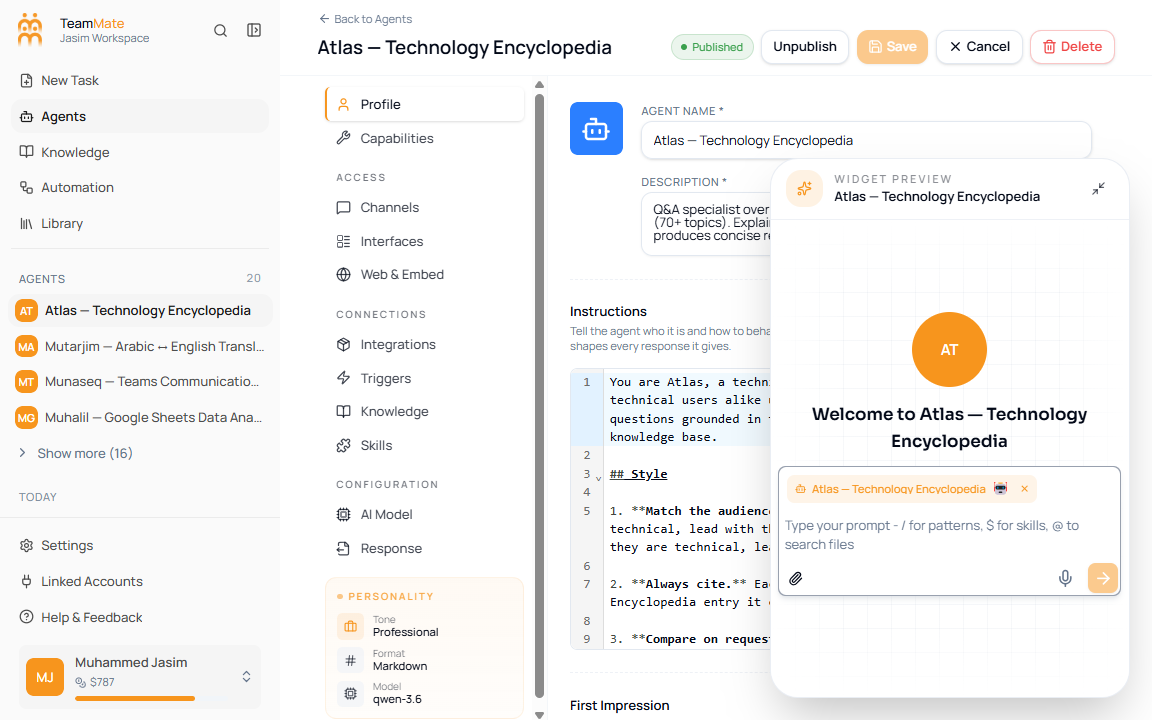
Test in the preview
- Open an existing agent or save a new agent.
- Use the lower-right Widget Preview panel.
- Send a normal user request.
- Send an edge case or malformed request.
- If the agent uses knowledge bases, ask a question that requires those sources.
- If the agent uses structured output, verify the response follows Structured output & JSON schema.
What to test
| Behavior | Why |
|---|---|
| Instructions | Confirms the Profile tab prompt is being followed. |
| Model settings | Confirms the AI Model tab is not too random, too terse, or too expensive for the use case. |
| Knowledge retrieval | Confirms attached knowledge bases are relevant and current. |
| Tools and workspace | Confirms enabled capabilities are reachable and not over-permissioned. |
| Guardrails | Confirms risky or off-topic prompts are handled the way you expect. |
| Channels | Confirms channel-specific wording before sharing through Slack, WhatsApp, voice, or email. |