Workflows
In the Employee Store, workflows appear under Automation. Use Flows to manage reusable multi-step automations, and use Schedules to run agent jobs immediately, once, or on a recurring cadence.
What you can do here
- Find flows with search, status filters, and pagination.
- Switch between grid and list views.
- Open the visual builder with New Flow or the per-flow edit action.
- Run active flows manually from the list.
- Review execution history and step-level outputs.
- Manage scheduled automation jobs from the Schedules tab.
- Delete draft, paused, or archived flows after confirming the warning.
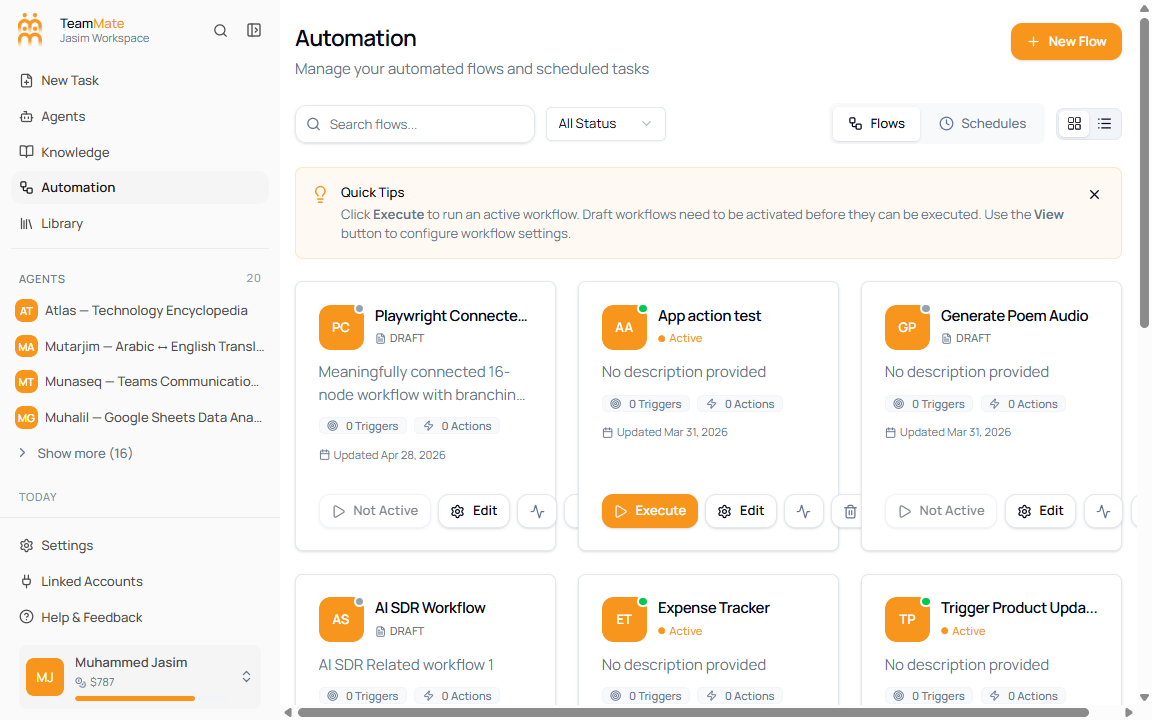
Automation tabs
| Tab | Use it for |
|---|---|
| Flows | Build and run multi-step workflow automations. |
| Schedules | Review scheduled tasks and recurring automation runs. |
This section documents both Automation tabs. Use Schedules for the jobs view.
Flow lifecycle
| Status | What it means | What users can do |
|---|---|---|
| Active | The flow is ready to run. | Execute it, edit it, view executions, or open the delete warning. |
| Draft | The flow is still being configured. | Edit it, view executions, or delete it after confirmation. |
| Paused | The flow is temporarily stopped. | Edit it, view executions, or delete it after confirmation. |
| Archived | The flow is no longer in normal use. | Keep it for reference or delete it if history is no longer needed. |
Active flows cannot be deleted directly. Deactivate or change the status before deleting.
Sections
| Section | What’s in it |
|---|---|
| Overview | Flow list, filters, views, quick tips, and per-flow actions. |
| Schedules | Scheduled jobs, run timing, execution history, detail pages, and edit/delete flows. |
| Visual builder basics | Canvas, palette, config panel, and builder controls. |
| Triggers | Start, Schedule, Webhook, and App triggers. |
| Actions & nodes | Agent, app, HTTP, code, retrieval, audio, image, and output nodes. |
| Conditional logic | Conditional, Fork, and Join nodes. |
| Testing a workflow | Manual execution from the Flows page and execution detail review. |
| Execution history | Run table, filters, actions menu, and step-level outputs. |