Search & retrieval behavior
There are two visible search surfaces in the Knowledge Base UI and one agent retrieval path.
Knowledge Base list search
The Search knowledge… field filters the top-level knowledge base records. The search is debounced, resets the list to page 1, and sends the query to the knowledge list endpoint. Use it to find the source record you want to inspect or attach.
Content search
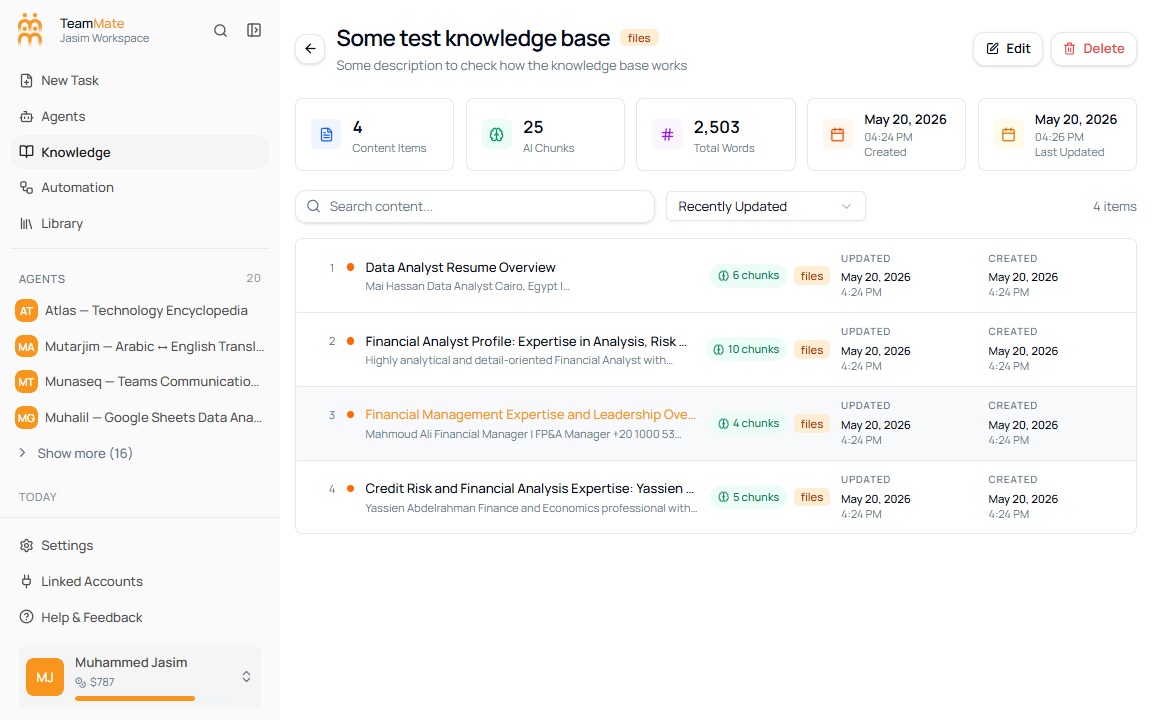
On a knowledge detail page, Search content… filters the content items inside that one knowledge base. It searches content titles and body text, then updates the visible count.
Chunks and embeddings
Knowledge content is split into chunks for AI retrieval. The UI exposes this in three places:
- Cards and list rows show total chunk counts.
- The detail page shows AI Chunks in the summary row.
- The content drawer shows chunk buttons and opens the vector embedding dialog.
The vector dialog is mainly a troubleshooting and inspection view. It lets admins confirm that content has generated embeddings and see model, dimensions, chunk index, and vector statistics.
Agent retrieval
Agents retrieve from knowledge bases attached in the builder’s Knowledge tab. The AI package provides knowledge tools that search attached sources, and the agent receives instructions that it has access to those selected knowledge bases.
Use the detail page to verify that a source has content and chunks before testing the agent. Use the agent builder test preview to confirm the agent can answer from the attached source.