Guardrails
Guardrails add safety and policy controls around an agent’s responses and actions. In the current builder, guardrails are part of the Capabilities tab, not a standalone tab.
What you can do here
- Apply a preset guardrail bundle.
- See how many guardrails are active.
- Expand Customize to review individual rules.
- Enable or disable individual guardrails by category.
- Adjust mode, strategy, and configuration fields for rules that support them.
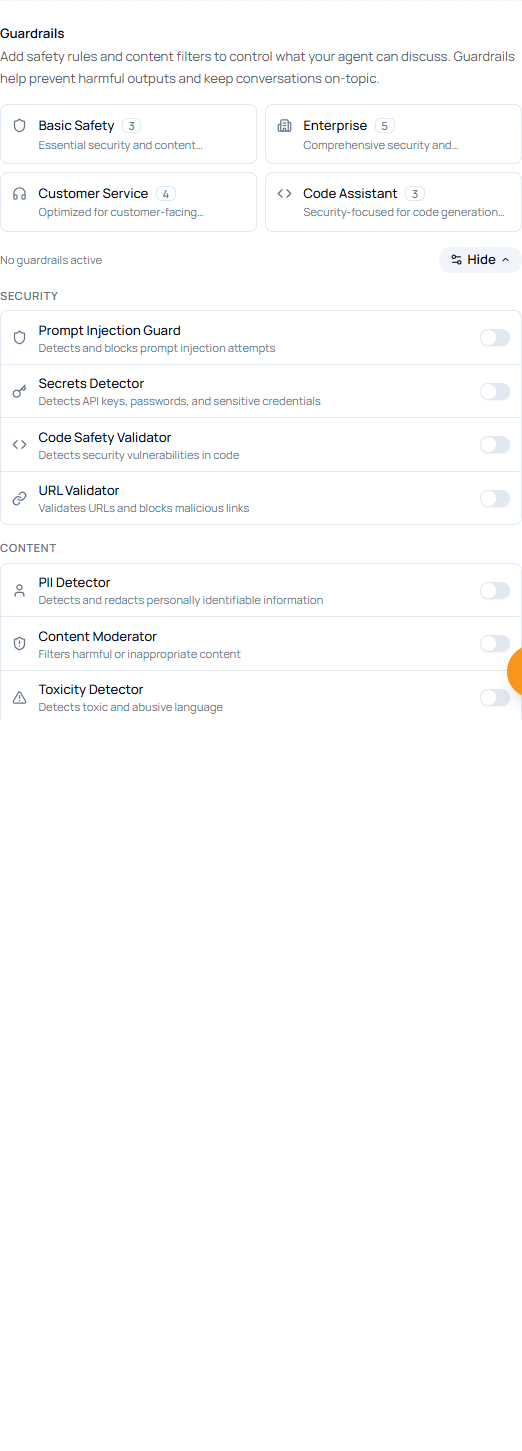
Presets
| Preset | Use when |
|---|---|
| Basic Safety | You need a general baseline for prompt injection, secrets, content, and similar risks. |
| Enterprise | The agent handles business, compliance, or regulated workflows. |
| Customer Service | The agent talks to customers and should stay helpful, safe, and on-topic. |
| Code Assistant | The agent writes or reviews code and needs code-focused safety checks. |
Individual guardrails
Click Customize to show categories such as Security and Content. Each row has a switch. Some selected guardrails expand to show mode, strategy, warning text, and configuration fields.
| Control | What it does |
|---|---|
| Mode | Defines where the guardrail applies, such as input or output. |
| Strategy | Chooses the action, such as block, warn, detect, or redact. |
| Config fields | Tune thresholds, lists, patterns, or other rule-specific settings. |