Publishing & sharing
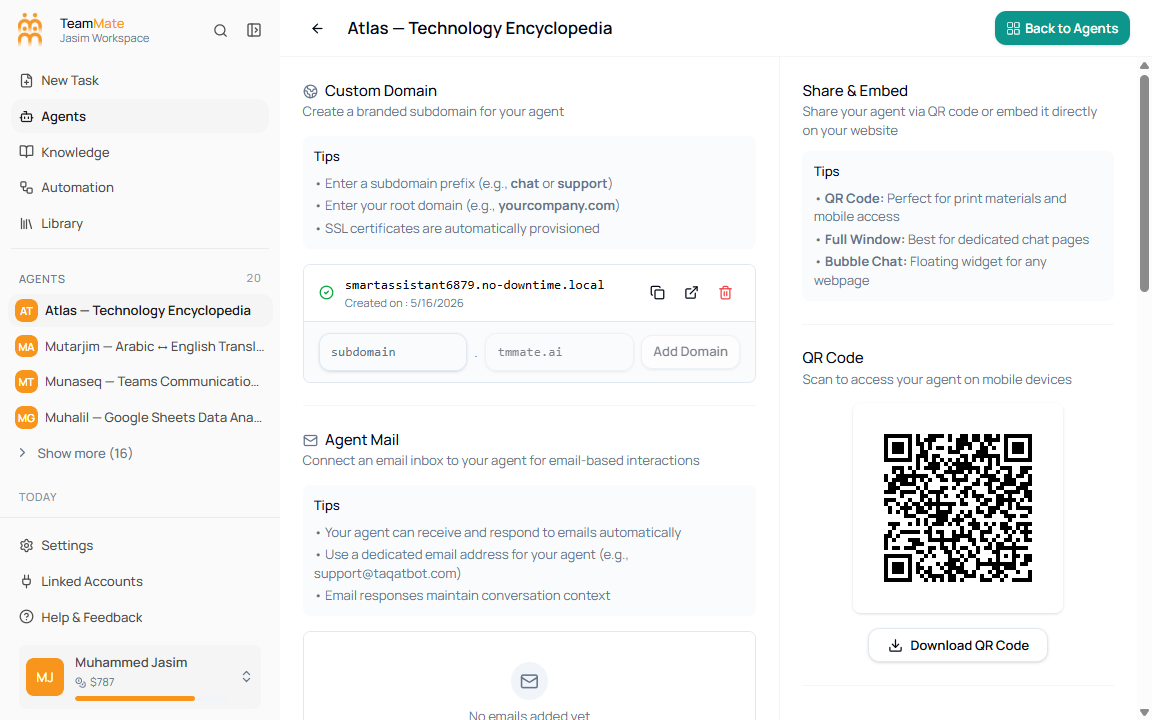
Publishing makes an agent available outside private builder editing. The current app has two related surfaces: the builder header for Publish and Unpublish, and the publish/share route for domains, agent mail, integrations, QR code, embed code, and the danger zone.
What you can do here
- Publish or unpublish from the agent builder header.
- Add or copy custom domains.
- Add agent mail addresses.
- Select an API key for embeds.
- Configure channel integrations.
- Share by QR code or embed snippet.
Publishing pages
| Page | What it covers |
|---|---|
| Publish flow | The steps that move an agent from draft to usable. |
| Custom domain | Branded subdomains and domain actions. |
| Agent mail | Email addresses in the publish/share route. |
| API key selection | Selecting a workspace API key for embeds. |
| Channel integrations | WhatsApp, Slack, Telegram, Twilio, and Vapi setup from the publish/share route. |
| Embed snippet (HTML) | Full-window and bubble-chat embed code. |
Before you publish
Confirm the profile, model, response format, knowledge, capabilities, guardrails, channels, and embed settings with realistic prompts.