Attaching knowledge bases
Knowledge bases let your agent answer questions using your content: policies, runbooks, product docs, past transcripts, or any source you have indexed.
What you can do here
- Attach one or more knowledge bases to an agent.
- Search the available knowledge bases by title or description.
- Review each source type, chunk count, and size before attaching it.
- Switch an attached source between Read and Read & Write access.
- Remove a knowledge base from the agent draft.
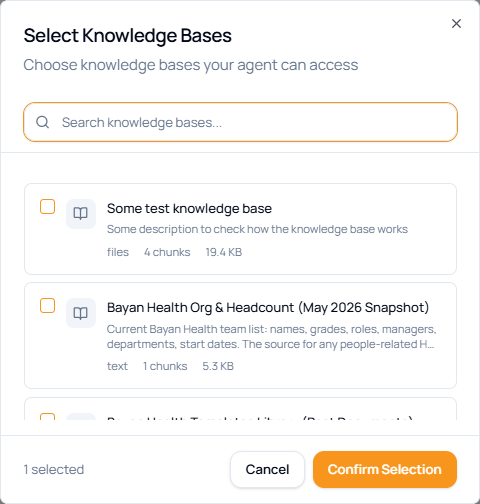
Attach a knowledge base
- Open the Knowledge tab in the agent builder.
- Click Add.
- Search available knowledge bases by name or description.
- Select the checkbox next to each knowledge base the agent should use.
- Review the listed type, chunk count, and size.
- Click Confirm Selection.
- Click Save in the builder header.
The attached knowledge bases appear in the Knowledge tab list. You can attach multiple sources; the agent can retrieve from all selected sources during chat.
Choose access
| Access | Use when |
|---|---|
| Read | The agent should reference the source but not update it. This is the safest default. |
| Read & Write | The agent is expected to maintain or update the source through tools that support writing. |
Remove a knowledge base
Click the trash icon next to the knowledge base in the list, then save the agent. Removing a source stops future retrieval from that source; it does not change existing chat history.
Choosing what to attach
- One knowledge base per topic. A “Sales playbook” knowledge base and a “Product specs” knowledge base is easier to test than one large mixed source.
- Keep sources fresh. See Organize & edit for maintenance.
- Watch the chunk count. Very large sources can increase retrieval latency.