Chat overview
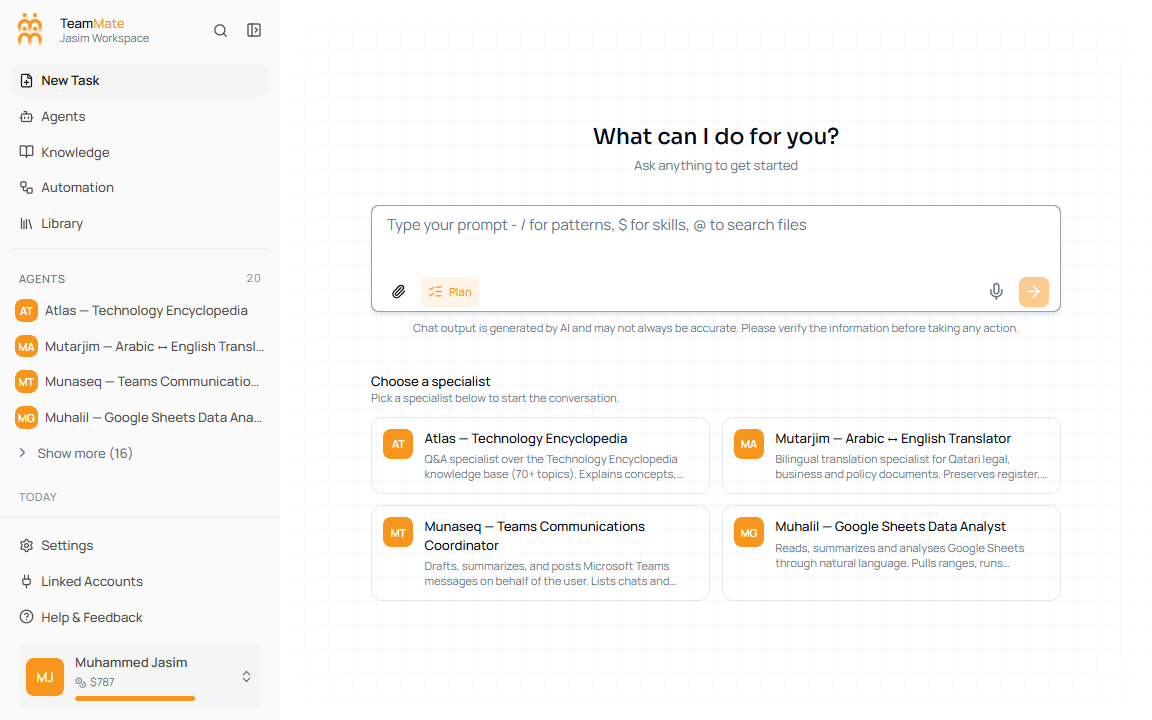
The current Chat screen is a task workspace. The left shell contains workspace navigation, agents, grouped chat history, settings, linked accounts, and user credits. The main area shows the current chat or the What can I do for you? empty state.
What you can do here
- Click New Task to start a fresh chat.
- Use the sidebar Agents list to open a specialist directly.
- Reopen chats from Today, Yesterday, Last 7 days, Last 30 days, or Older groups.
- Use the composer to send prompts, attach files, record voice, enable Plan mode, or add slash/skill/file tokens.
- Continue existing chats from the detail page.
Main areas
| Area | What it does |
|---|---|
| App sidebar | Shows New Task, Agents, Knowledge, Automation, Library, Settings, Linked Accounts, Help & Feedback, and the signed-in user. |
| Agents group | Shows the first few agents in the current app and a Show more popover when more agents exist. |
| All chats history | Groups recent chats by date and links each row to its chat detail route. |
| Main chat canvas | Shows the empty state, active transcript, tool results, or plan approval card. |
| Composer | Accepts text, files, slash commands, skills, file mentions, Plan mode, voice recording, and send/stop actions. |
Routes
The current app path for a new chat is /app/:appId/chat. After the first message, the app keeps the same chat mounted and updates the URL to /app/:appId/agents/:agentId/chat/:chatId.