AI-assisted instruction generation
The Enhance with AI button opens a dialog that uses the current agent name, description, existing instructions, and your requirements to generate a ready-to-use instruction prompt.
What you can do here
- Build instructions from scratch when the editor is empty.
- Enhance existing instructions when the editor already has content.
- Review the current agent name and description before generating.
- Enter required generation requirements.
- Cancel without changing instructions.
How to generate instructions
- Open the agent in the builder.
- Go to Profile.
- Click Enhance with AI in the Instructions section.
- Enter the requirements the generated prompt should follow.
- Click Build Instructions or Enhance Instructions.
- Review the generated instructions in the editor.
- Save the agent.
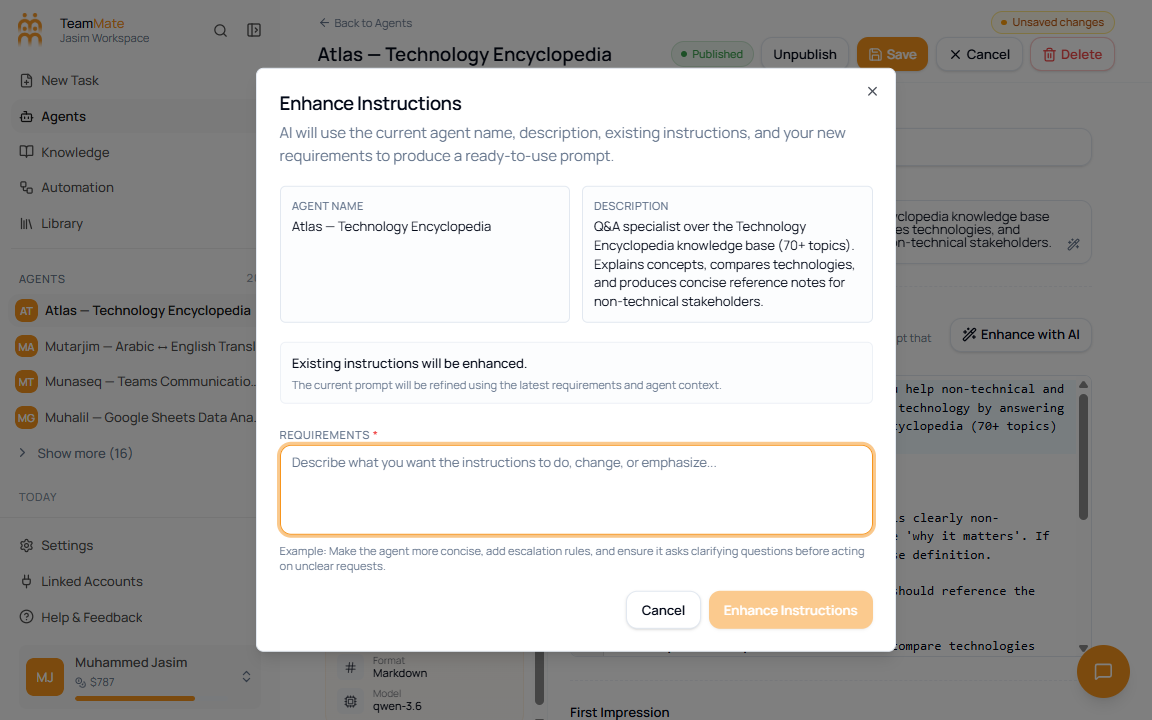
Dialog fields
| Field | Required | Accepted values | What it controls |
|---|---|---|---|
| Agent Name | No direct edit in dialog | Read-only context | Shows the current name used by AI generation. |
| Description | No direct edit in dialog | Read-only context | Shows the current description used by AI generation. |
| Existing instructions status | No | Read-only context | Explains whether AI will build from scratch or enhance current instructions. |
| Requirements | Yes | Plain text | Tells AI what to include, change, or emphasize. |
Important behavior
The dialog cannot submit while Requirements is empty. Closing the dialog clears the requirements field unless a generation request is already running.