Web sources
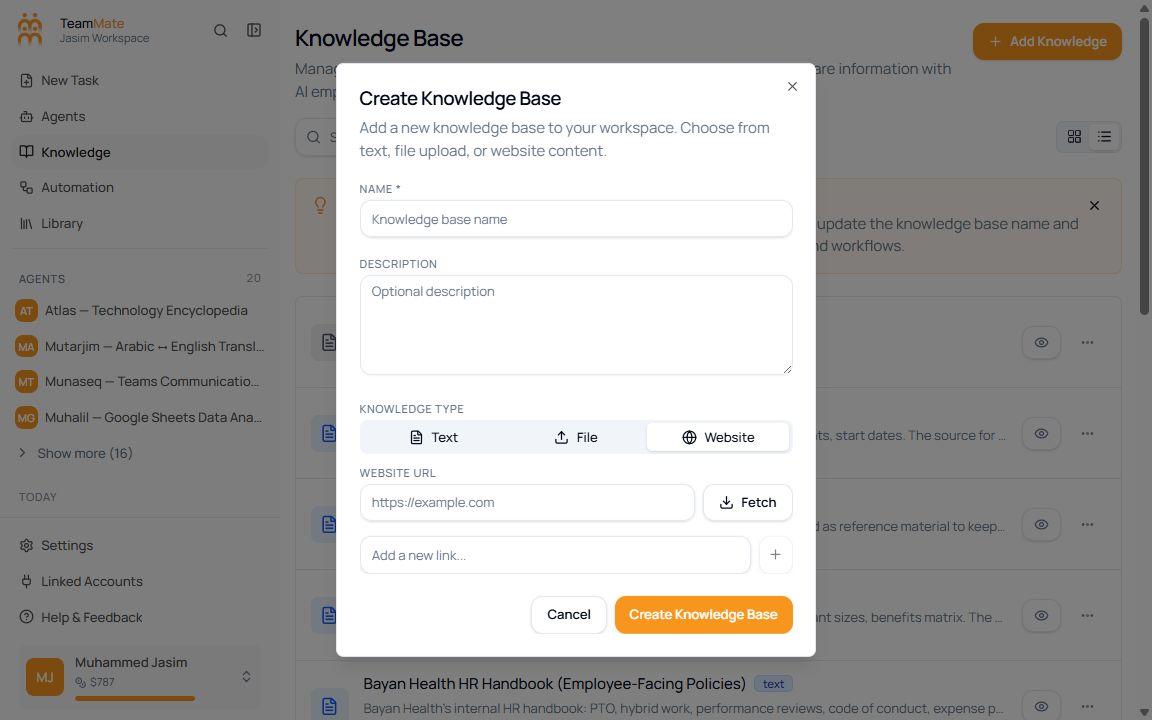
Use the Website source type when the knowledge base should be built from URLs. The dialog supports a starting Website URL, a Fetch action that discovers links, and a manual link field for adding individual URLs.
Add website links
- Open Knowledge Base.
- Click Add Knowledge.
- Enter a Name and optional Description.
- Select Website.
- Enter a starting URL in Website URL.
- Click Fetch to collect links from that site.
- Review, edit, or remove discovered links.
- Add extra URLs with Add a new link… if needed.
- Click Create Knowledge Base.
Fetch behavior
The app sends the starting URL to the website-link fetch endpoint with a maximum depth of 2 and a maximum of 50 links. If the fetch succeeds, the dialog shows the discovered links. If it fails, the dialog shows an error state and toast.
Manual links
Use the manual link field when you already know the exact page URL or when the fetch result does not include the page you need. The app validates the URL before adding it to the list.