Skills tab
The Skills tab attaches reusable instruction bundles to an agent. A skill is a reusable behavior package the agent can load when a user’s request matches the skill description.
What you can do here
- Search skills by name or description.
- Filter by All, Workspace, or Platform skills.
- Review attached skills.
- Attach available skills.
- Detach skills from the agent draft.
- Save all skill changes with the agent.
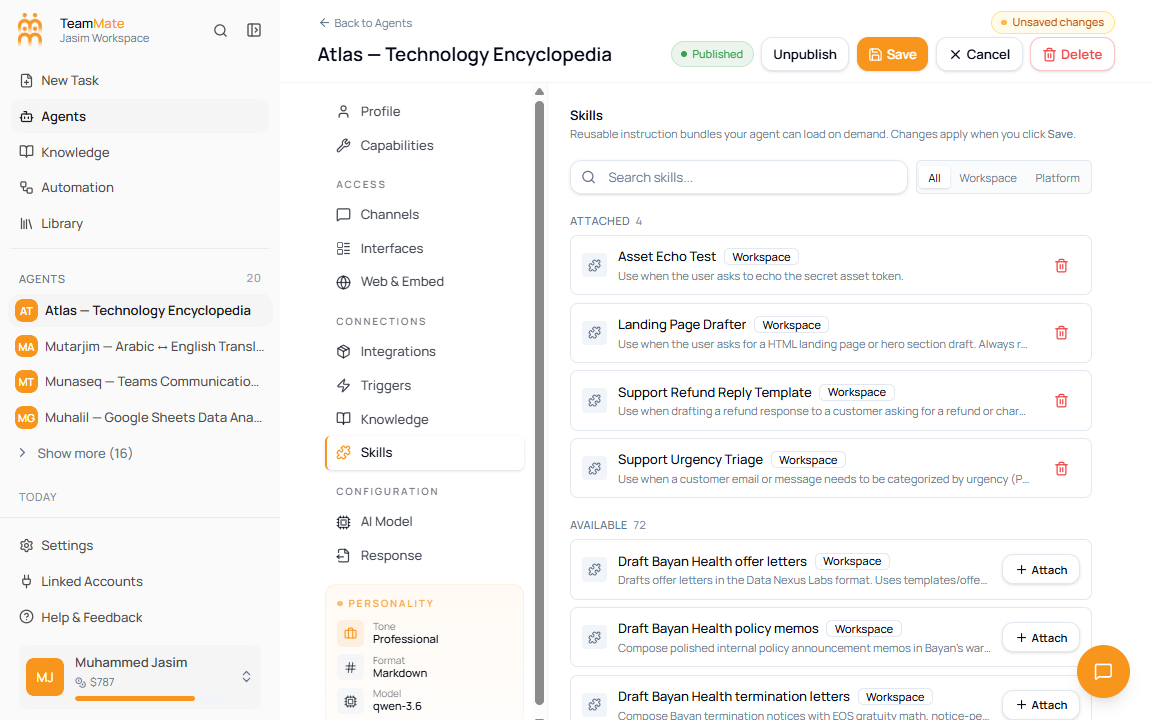
Attach a skill
- Open Skills.
- Search for a skill or choose a scope filter.
- Review the Available section.
- Click Attach on the skill row.
- Click Save in the builder header.
Remove a skill
- Open Skills.
- Review the Attached section.
- Click the delete icon on the skill row.
- Click Save in the builder header.
Fields and controls
| Field or control | What it means |
|---|---|
| Search skills | Filters attached and available skills by name or description. |
| All | Shows workspace and platform skills. |
| Workspace | Shows skills authored in this workspace. |
| Platform | Shows built-in platform skills. |
| Attached | Skills currently selected for this agent draft. |
| Available | Skills that can still be attached. |
| Skill scope badge | Shows whether the skill is workspace-owned or platform-provided. |
| Attach | Adds the skill to the agent draft. |
| Delete icon | Removes the skill from the agent draft. |
Save behavior
Skill changes are batched. Attaching or removing a skill updates the draft only. The actual attach and detach requests run when you click Save.